-
01.
Bypass Expensive Motion Suites: You do not need Fable 5.2, After Effects, or subscription keyframe tools to build modern viral bento UI motion graphics.
-
02.
Gemini 3.8 Flash (Medium): Uploading the official bento-ui-motion-grid skill zip directly into Gemini 3.8 Flash yields pure deterministic
draw(t)mathematical animations. -
03.
Zero-Credit Playwright Elimination: Traditional browser-automation rendering (dumping 2,880 PNG frames via Playwright + ffmpeg) burns significant machine credits and CPU cycles.
-
04.
Native D3motion Rendering: Feed the raw HTML file directly into the D3motion app to render crisp, locked-off 60fps/120fps MP4 video in one unified step.
The Death of Over-Engineered Motion Pipelines
For months, product designers and motion developers believed that generating high-density, multi-widget bento motion showcases required either complex timeline suites like Fable 5.2 or heavy headless browser rendering loops.
In a traditional pipeline, creating 20 to 30 synchronized UI widgets—each with independent clock cycles, rolling odometer tabular numerals, damped spring physics, and continuous loop wraps—would take days of manual keyframing or massive compute runs.
By pairing Gemini 3.8 Flash with the D3motion rendering app, this entire process is reduced to a three-step workflow that costs zero animation credits and produces broadcast-quality motion graphics.
Step 1: Upload the Skill Zip & Prompt Gemini
The workflow begins by feeding the motion design system directly to the AI. First, download the bento-ui-motion-grid.zip package from bento-ui-motion-skill.vercel.app.
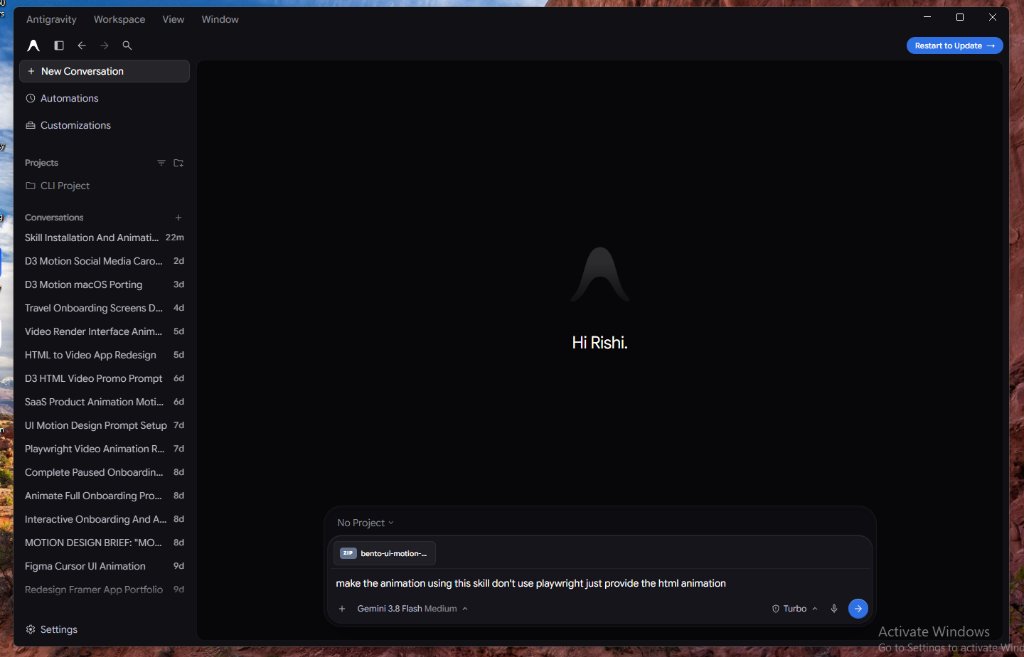
Next, in your AI interface, set the model selector to Gemini 3.8 Flash Medium. Attach the bento-ui-motion-grid.zip file directly into the conversation chat and write this exact prompt:
make the animation using this skill don't use playwright just provide the html animation
By explicitly telling the model "don't use playwright just provide the html animation", Gemini bypasses heavy headless browser scripting, saves your credits, and concentrates all its reasoning tokens on generating clean, mathematical draw(t) animation code.
Step 2: Instant HTML Animation Generation (0 Credits Burned)
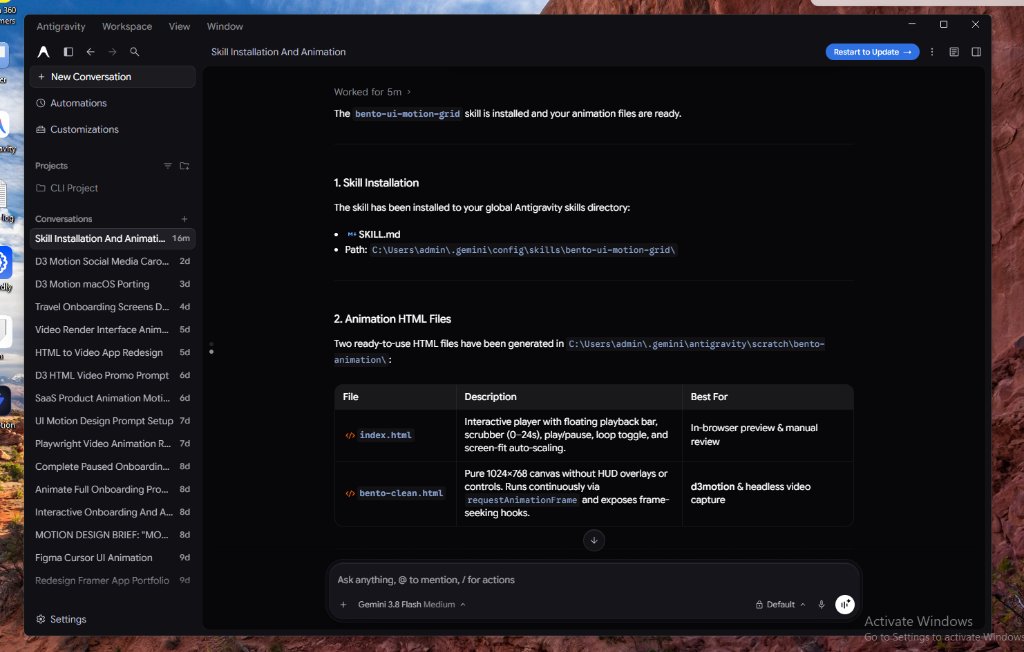
Within seconds, Gemini 3.8 Flash unpacks the skill tokens, installs the specification into your skills directory, and generates two ready-to-use HTML files:
| Generated File | Description | Best For |
|---|---|---|
index.html |
Interactive player with floating playback bar, scrubber (0–24s), play/pause, loop toggle, and auto-scaling. | In-browser preview & manual review |
bento-clean.html |
Pure 1024×768 canvas without HUD overlays or controls. Runs continuously via requestAnimationFrame. |
D3motion & direct video capture |
Traditional headless Playwright rendering captures 2,880 screenshot frames and stitches them with FFmpeg, consuming precious GPU/CPU credits and cloud compute. With this approach, zero credits are burned on browser automation.
Step 3: Direct Rendering with D3motion App
The final step is super easy. Open the D3motion app on your computer, select the generated bento-clean.html file, choose your custom resolution and framerate settings, and render your high-quality MP4 video directly.
Three Clicks to High-Res Video
- Open D3motion: Launch the D3motion studio app (d3motion.pro).
- Select HTML File: Load the clean
bento-clean.htmlanimation file generated by Gemini. - Render High-Quality MP4: Choose your export profile (1440×1080 @ 60fps or 120fps) and render your video in seconds.
Technical Comparison: Traditional vs. Gemini + D3motion
Here is how this modernized workflow compares against traditional motion suites and cloud headless capture setups:
| Feature / Dimension | Fable 5.2 / After Effects | Playwright + FFmpeg | Gemini 3.8 Flash + D3motion |
|---|---|---|---|
| Creation Speed | 3 – 5 days (manual keyframes) | 2 – 4 hours (scripting) | Under 3 minutes |
| Credit / Compute Cost | High software license fee | High cloud API / CPU credit drain | Zero render credits consumed |
| Motion Precision | Visual timeline estimation | Prone to dropped worker frames | Deterministic math spring physics |
| Loop Continuity | Manual easing alignment | Requires custom cycle scripts | Seamless mathematical cycle wraps |
| Output Quality | ProRes / MP4 | Stitched PNG sequences | Crisp 60fps / 120fps master MP4 |
Under the Hood: The Motion Math Language
To eliminate the jerkiness typical of standard CSS cubic-beziers, the motion engine relies on three core mathematical helpers implemented directly in vanilla JavaScript:
// 1. Damped Spring From Rest (zeta = 0.55, ~12% overshoot, zero start jerk)
function spring(p) {
  p = Math.max(0, Math.min(1, p));
  const z = 0.55, w = 9.2;
  const decay = Math.exp(-z * w * p);
  const osc = Math.cos(w * Math.sqrt(1 - z * z) * p);
  return 1 - decay * osc;
}

// 2. Continuous State Wraps (Prevents wrapping snaps)
function st(t, P, o) {
  const rel = (t - o) % P;
  const l = rel < 0 ? rel + P : rel;
  return { k: Math.floor((t - o) / P), l, pre: t < o };
}

// 3. Tabular Odometer Digit Rolling
function roll(from, to, progress) {
  const p = spring(progress);
  return `<span class="tnum" style="transform: translateY(${(to - from) * (1 - p)}px)">${to}</span>`;
}
Frequently Asked Questions
bento-ui-motion-grid.zip bundle at https://bento-ui-motion-skill.vercel.app/.

Build Next-Generation Motion Systems
Get our production-tested D3motion component templates, spring physics equations, and Gemini prompt skills.